|
Explore your digital images - with
a single click
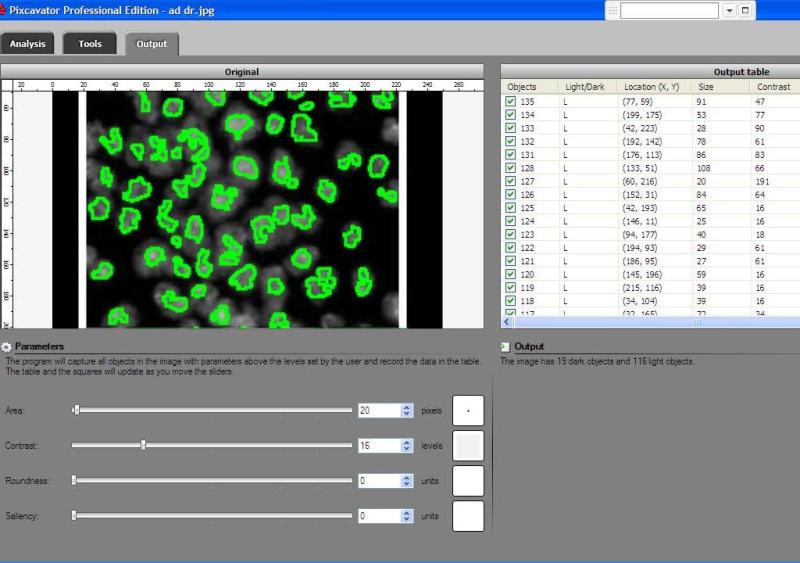
Pixcavator is fully automatic. By pushing a single button� the user obtains the list of all objects in the image. The list contains the size, location, and other characteristics of each object. Meanwhile, the objects in the image are captured with contours or squares. More...
Pixcavator�s image analysis methods are based on our original research in computer vision. The software is backed up by a thorough exposition of these methods in our
Computer Vision Primer.
Features
� Upload images in the most popular formats: JPEG, BMP, PNG, GIF, TIFF
� Adjust brightness, contrast, hue and saturation, apply erosion and dilation, auto-contrast, crop, subtract, add border, detect edges, add noise and blur, apply the median and other filters, etc�
� Automatically capture contours of objects in the image
� Produce the output spreadsheet with data about these objects - location, size, contrast, roundness, intensity, and more
� Mark and unmark objects, one by one or in groups, in the image and in the spreadsheet
� Isolate objects you are interested in and save them as separate images
� Export the output spreadsheet to Microsoft Excel
Screenshot:
 �
If your interest is in image mining and microscopy, consider cellAnalyst.
�
If your interest is in image mining and microscopy, consider cellAnalyst.
|
|

�
�
�
�
�
�
�
�
�
�
�
�
�
�
�
�
�
�
�
�
�
�
�
�
�
�
�
�
�
�
�
�
�
�
�
�
�
�
�
�
�
�
�
�
�
�
�
|